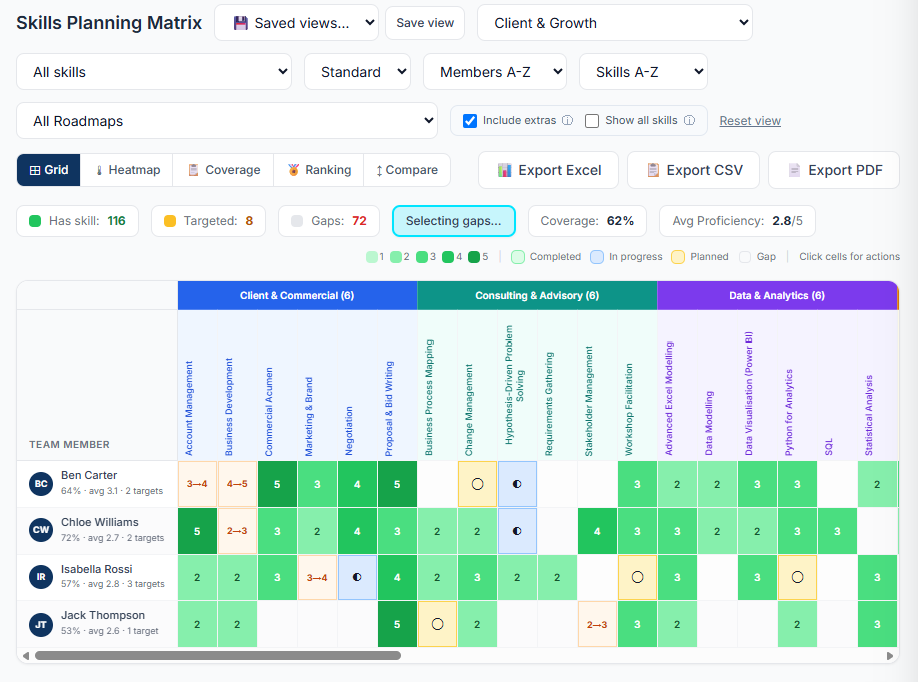
What is a skills matrix?
A skills matrix is a grid that lists the people in a team down one side and the skills the team needs across the top, with a rating in each cell showing how proficient each person is in each skill.
It answers three questions a payroll system cannot: who can do what, how well, and where the team is exposed. A good matrix shows where capability is strong, where it is thin, and where it depends on a single person.
Most businesses start with a spreadsheet. That works until the team grows, people change roles, and nobody is sure which version is current. Skills matrix software keeps one live copy, measures it against what each role requires, and keeps it up to date as the organisation changes.
How the Sorakan skills matrix works
One 1 to 5 scale, used everywhere
Every rating in Sorakan uses the same five levels. The same scale describes what a person holds, what a role requires and what a training course builds to, so a gap means the same thing wherever you see it.
| Level | Name | What it means |
|---|---|---|
| 1 | Awareness | Understands the concept and terminology. |
| 2 | Working Knowledge | Can apply with guidance. |
| 3 | Competent | Independently applies the skills. |
| 4 | Advanced | Can solve complex problems and coach others. |
| 5 | Expert | Recognised technical authority; develops organisational capability. |
Gaps measured against the role
Each role lists the skills it needs and the level required for each. The matrix compares every person with their role and highlights the cells that fall short. You see the gap, how large it is, and who it belongs to.
Views that stay readable at any size
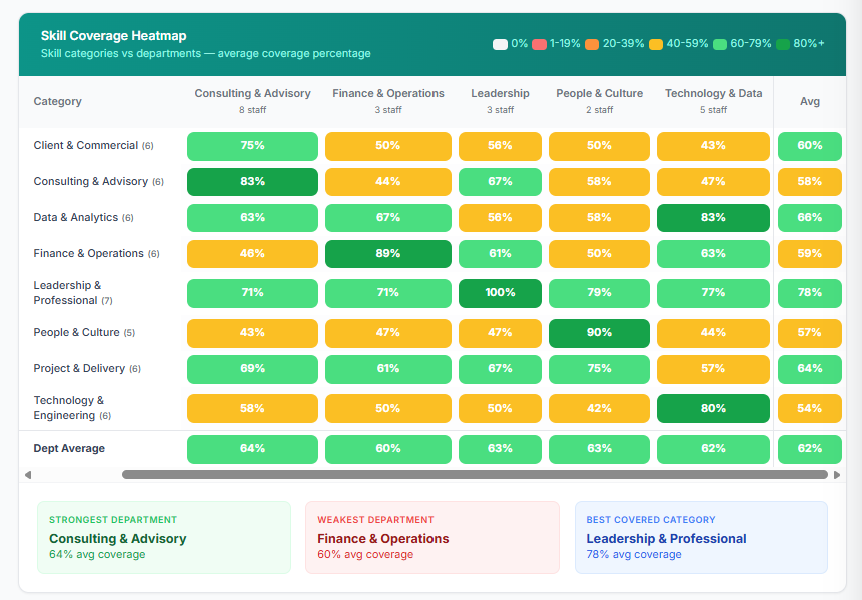
A matrix of 80 people and 120 skills is unreadable as one grid. Sorakan lets you scope the view to a team, a role, a skill category or a single focus area, switch to a heatmap of coverage, and save the views you use most.
Less typing to get started
- JD Parser. Paste a position description and Sorakan drafts the role's required skills from it.
- Resume Reader. Upload a resume and Sorakan suggests skills for that person, each with the quote that supports it. Nothing is saved until a manager agrees.
- Copy skills between roles. Seed a new role from a similar one, then adjust the levels.
The matrix feeds everything else
Because skills are stored once, the same data drives role fit and gap analysis, development plans, the training matrix, the nine-box talent grid and succession planning. Soraku, the inbuilt AI assistant, reads it to answer questions such as "where is our biggest skills gap?" in plain English.
Spreadsheet skills matrix vs Sorakan
| Question | Spreadsheet | Sorakan |
|---|---|---|
| Is it current? | Only if someone remembers to update it | One live copy that managers update in place |
| What is a gap measured against? | Usually nothing, the numbers stand alone | The required level for each skill in the person's role |
| Can it scale? | Becomes unreadable past a few dozen people | Scoped views by team, role and category, plus a heatmap |
| Who can see it? | Anyone with the file | Managers see their own reporting line, enforced in the database |
| Is there a history? | Overwritten each time | Changes to each person's skills are recorded over time |
| Does it connect to anything? | No | Roles, training, qualifications, talent grid and succession |
| Can you ask it a question? | No | Yes, through Soraku |
How to build a skills matrix in five steps
- List the skills that matter. Start with the 20 to 40 skills your work actually depends on, grouped into a few categories. You can add more later.
- Agree one rating scale. Use a single scale with a plain description for each level, so a 3 means the same thing to every manager.
- Define what each role requires. For each role, pick the skills it needs and the level required. This is what turns ratings into gaps.
- Rate each person. Have managers rate their own team, ideally in conversation with each person.
- Act on the gaps, then keep it current. Turn the biggest gaps into training or development plans, and update ratings as people learn.
In Sorakan, steps 2 and 5 are built in, and the JD Parser and Resume Reader speed up steps 3 and 4.
Plans and pricing
The skills matrix, gap analysis and scoped views are included in every plan, starting with Starter at A$40 per month for 10 licences. Saved matrix views are part of Pro at A$120 per month. Every workspace starts with a free 14-day trial of full Pro. See pricing for the full comparison.
Skills matrix questions
What is a skills matrix?
A skills matrix is a grid that lists the people in a team down one side and the skills the team needs across the top, with a rating in each cell showing how proficient each person is in each skill. It shows at a glance where capability is strong, where it is thin, and where it depends on one person.
What is skills matrix software?
Skills matrix software keeps that grid in a shared system instead of a spreadsheet. It stores ratings per person and skill, compares them with what each role requires, highlights the gaps, and keeps the picture current as people join, leave, train and change roles.
How many proficiency levels does Sorakan use?
Five. Level 1 is Awareness, level 2 is Working Knowledge, level 3 is Competent, level 4 is Advanced and level 5 is Expert. The same scale is used for what a person holds, what a role requires and what a training course builds to, so a gap always means the same thing.
What is the difference between a skills matrix and a competency matrix?
The terms are often used interchangeably. Strictly, a skills matrix rates specific, teachable abilities, while a competency matrix can also cover behaviours and attributes. In Sorakan you define the skill library yourself and group it into categories, so it can hold either.
How does a skills matrix show skill gaps?
Each role in Sorakan lists the skills it requires and the level required for each. The matrix compares every person with the requirements of their role and highlights the cells that fall short, so a gap is a measured difference instead of an impression.
Can we move from an Excel skills matrix to Sorakan?
Yes. You import your people, define your roles and skills, and the matrix is live straight away. Most teams are set up the same afternoon, and you can export the matrix back to Excel at any time.
Who can see the skills matrix?
Admins see the whole organisation. A manager sees skills for the people in their own reporting line, and for themselves. Viewer accounts see the skills library but no per-person ratings. These rules are enforced in the database.
Is the skills matrix included in every plan?
Yes. The skills matrix, gap analysis and scoped views are in every plan, including Starter at A$40 per month. Saved matrix views are part of Pro.
See your own skills matrix this afternoon.
Start a free 14-day trial with full Pro features and no card required, or book a 20-minute walkthrough.